
For landlords and property managers
Jobs your vendors skip.
Off your desk, today.
Today, send the haul-aways, turnover cleans and small repairs your good vendors turn down. Approve the price up front, see photos when it’s done, and pay for a job only after the work is done.
In the app now: resident requests in one queue, your own team first, and Pros on Home Harbor when nobody takes it.
Home Harbor’s fee applies only to jobs you send out to Pros and Helpers, from the first job. One business account for your office.

Your workflow stays yours
Your team keeps its workflow. It just has one more place to send a job.
Add your properties once, with the gate code, parking and on-site contact. Only the worker who takes the job sees them. Every job keeps its photos, approved price and receipt on that property’s record.
- Pros set their own prices, and Helpers see the price before they accept.
- Your vendors stay yours. Send us only the jobs they pass on.
- Nobody pays to be sent your work. The worker is paid from the job price.
Before you say yes
Hard questions.
Short answers.
Pick a question to see the short answer, marked live today or coming in an app update.
The turn list combines every job for a unit, the haul-away, the clean and the small repairs, and schedules them together. One list per turn, not a string of calls.
- Haul-away
- Turnover clean
- Small repairs
- Scheduled together
Keep both: export closed jobs as a spreadsheet file, with the unit, work order number and GL code on every row. It is an export, not a live sync.
- Unit
- Work order number
- GL code
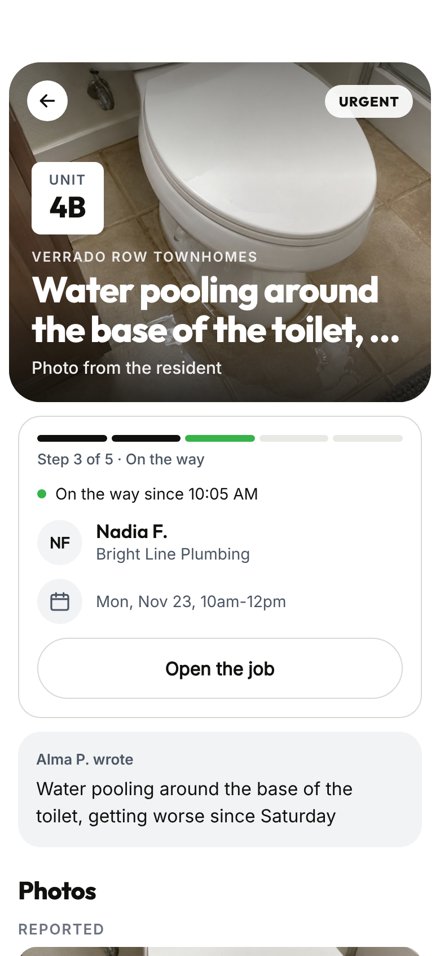
Resident to your office, your team first, then a Pro: each is told when it reaches them. Owner sign-off by email is coming in an app update, and safety work will never wait for an owner.
Add your buildings and units in the app, or ask for a walkthrough and we will set them up with you. Add the gate code, parking and on-site contact once; only the people assigned to the job see them.
- Gate code
- Parking
- On-site contact
Yes. Staff join by an invite link and see your jobs first, and work your own team or vendors do carries no Home Harbor fee.

One invoice per job, sent after the work is done, with the unit, work order number and GL code on it. Terms will be net 30.
- Unit
- Work order number
- GL code
- Net 30
You will approve the price first and get the invoice after the work is done. Your office will send one bank transfer or mail one check a month; we will never pull from your account.
Every resident request across your properties on one screen: who is on it, where it stands, what needs you.
Jobs you give to your own technicians or vendors, tracked in the same place at no fee.
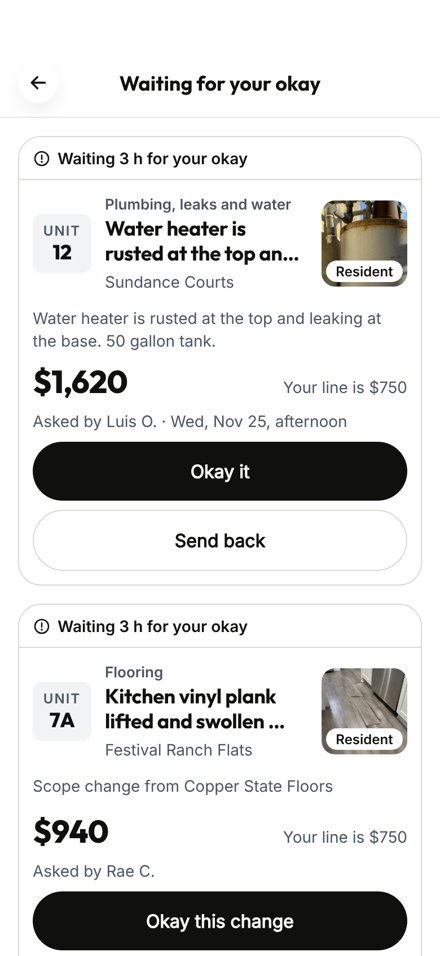
Set the price line above which a job waits for your approval.
Work order numbers and GL codes on every job, and closed jobs export to a spreadsheet.
Approve a job and the people who need to know hear about it, without a second message.
Owners you choose approve by email, and safety work never waits for them.
Getting started
Getting started with a business account
Ask for a walkthrough and we will set up one business account with your addresses. You send the small jobs your vendors do not want; we fill them from Helpers and Pros already working your area.
Jobs you send out on Home Harbor are booked, tracked and approved in the app. Free on iPhone and Android.

Questions from landlords and managers
When does the fee apply?
From your first job. There is no free period and no free jobs. Home Harbor’s fee applies only to jobs you send out to Pros and Helpers on Home Harbor. Jobs you give to your own team or your own vendors are tracked at no fee.
I own a few rentals, not a management company. Is this for me?
Yes. Tell us about your doors below. A business account works the same for one landlord as for an office: your addresses, a price before every job and photos when it’s done.
Who can book?
Your office books on one business account. On the walkthrough we cover who may book and what needs your approval first.
Who does the work?
Independent Helpers and Pros who already work in your area. Pros on Home Harbor set their own prices, and we walk you through what Home Harbor checks before anyone takes a job.
How fast will someone respond?
We set response-time targets with each account, and we’re adding a monthly report on response times. They are targets, not guarantees. Emergencies such as no heat, no water, flooding, gas or an electrical hazard are not handled through Home Harbor. For those, call your own emergency vendor, or 911 if anyone is in danger.