
For Harbor Helpers
Cover a bill this week.
Build a trade this year.
Simple jobs near you, with the pay shown before you say yes. Take one to cover a bill, or take the next step toward a new line of work. No experience needed and no fee to join.
I need money this week
See the pay before you say yes
Every offer shows the task, the time, the area and the pay in dollars before you answer. Take one job or a few. Tips are extra and 100% yours.
Example offer. Real offers show their own pay.
I want a new line of work
Start as a Helper. Finish with a trade.
Each category has a short skill check. Do great work in it and you earn the badge. Stack enough of them and you’re ready to run your own Pro business on Home Harbor.
In the app
See every dollar. Keep every tip.
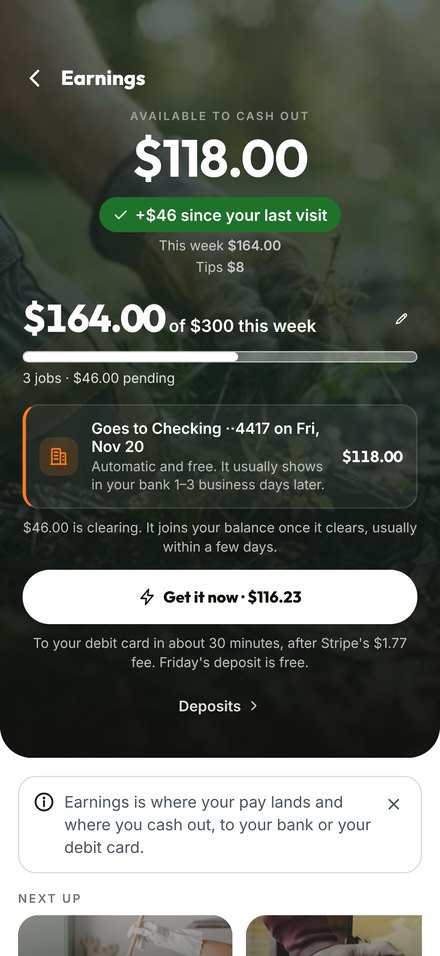
What you’ve earned this week and what’s on its way to your bank, on one screen, with a shortcut to open jobs. Tips are 100% yours.
Your customers list keeps everyone you’ve helped, with your own notes, so a good job can turn into the next one.
Pick what you’ll do great
Two or three you’d stake your rating on
Homeowners rebook the person who did it right. Start with the work you can do really well, every time. You can add more once you’ve earned the badge.

How every category works: pass a skill check in the app (about 10 minutes) and you can take jobs in that category. Certified after 3 jobs from 3 different homeowners, each rated a 4.5 or higher. The badge stays while your recent ratings average 3.5 or better.
One Saturday, as a pay stub
The whole job fits on one slip
No tutorial. Keep scrolling and watch an example Saturday print itself onto the stub, line by line, from the first ping to the deposit. Setup came first, earlier that week: an ID check, a background check, a bank for payouts, and job alerts on.
Lawn mowing, 4 miles away, 9:30, $55. Task, time, area and pay are shown before you answer. You tap yes.
One tap at the gate. The homeowner sees you’re there; nobody texts “ETA?”.
Two photos, before and after. That’s your proof, and it’s your work on your profile.
They tap approve. If they forget, it approves itself 24 hours after you close out. Either way the job is paid.
$12. Tips are 100% yours; we don’t touch them.
A free automatic deposit every Friday. Need it sooner? Take an instant cash-out to your debit card, with Stripe’s fee shown before you tap.
Example pay stub
No fee to join. The pay is shown before you say yes. Tips are 100% yours. That slip is what a Saturday can look like, with a free deposit every Friday.

When you’re ready for more
Build a crew. Take bigger jobs.
Tap Become a Pro in the app and keep your Helper jobs while you grow. The Pro side adds quotes, bookings and your own customers.
- Bigger jobs. Finish your Pro setup and turn on payouts, and you can quote skilled jobs. Projects open once five different customers have reviewed you, your rating averages 4.0 or better, and your insurance is verified.
- Your own crew. Invite people to your team and give them jobs. Need extra hands on a big job? Request Helpers, set the pay per person, and each Helper is paid through the app.
- Your own business. A storefront with your services and prices, and customers who can book you again.
Helper questions
Am I an employee?
No. Helpers are independent contractors. You choose which jobs to take and when to work.
Do I need experience?
No. Helper jobs are simple tasks, and lessons in the app cover what each category expects.
How much will I make?
Each offer shows its pay in dollars before you accept. You keep all tips.
When do I get paid?
Once the homeowner approves the job, or 24 hours after you close it out. Payouts go to your bank every Friday and usually land 1–3 business days later, or cash out your available balance whenever you like (an instant cash-out needs a debit card on file, moves $25 or more at a time, and carries Stripe's instant fee).
Why can’t I see offers yet?
Offers start once payouts are set up, so every job you take is one you can be paid for.
